In 2026, could I publish 10 apps to 4 app stores and manage all the security and features to build a profitable small business? At least 5 of the apps are paid. Translate all the screens into 26 languages.
Why? Given this is 40 versions of production apps, it will push the limits of what a solo entrepreneur can manage given the superpowers now enabled by AI tools such as Antigravity and Claude Code.
The 4 app stores I will publish is on iOS App Store, Mac App Store, Windows Store and Google PlayStore
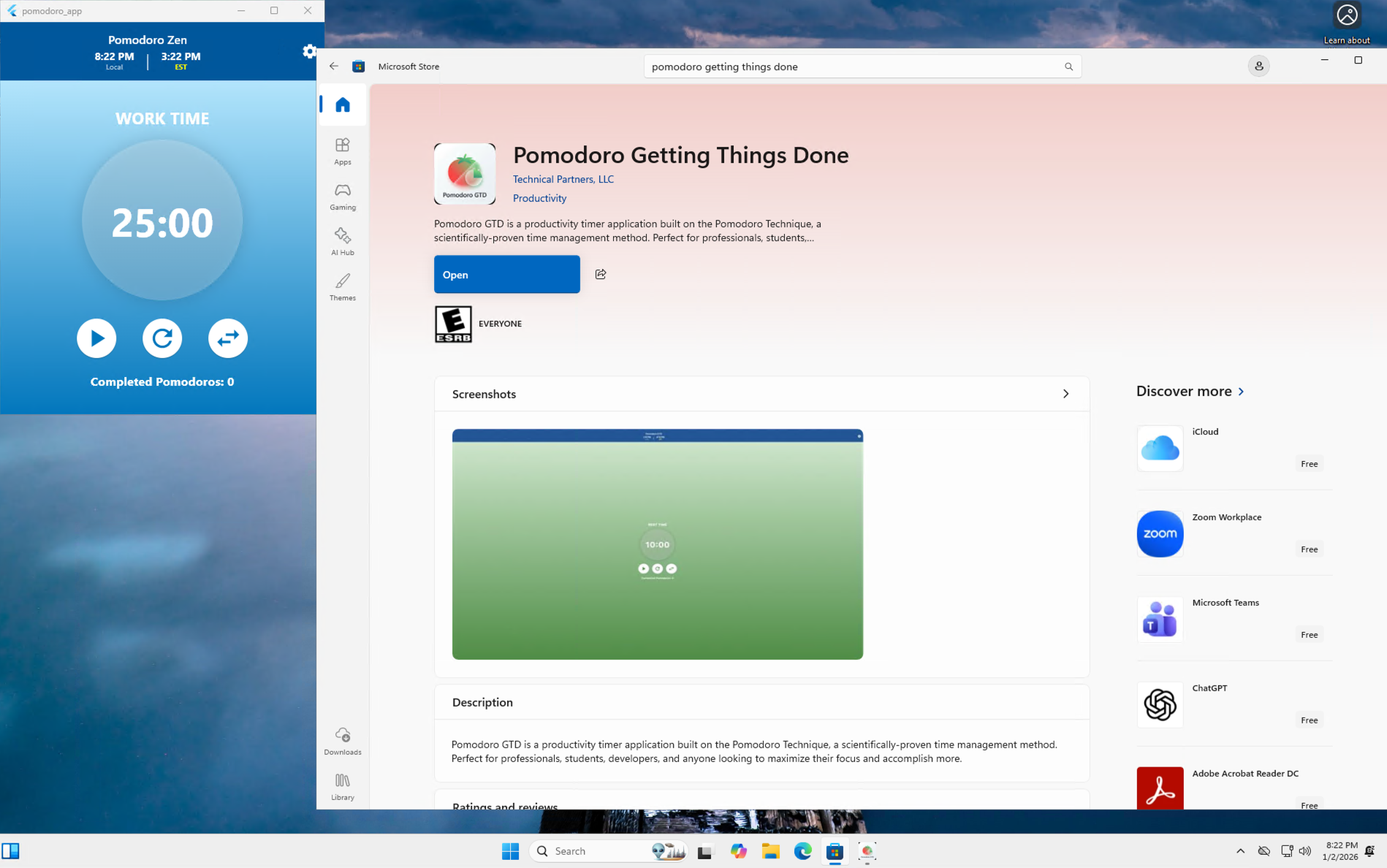
Jan 2nd, 2026 – Published my first app on Windows.
Here are my learnings
Publishing to the Windows App Store is faster and easier than Google Playstore and App App store – I think it’s because Microsoft is hungry to have more apps
There is a gap in really polished apps for Windows given there are more Windows users, but less delightful apps
I have never used Azure before so I signed up to get Windows Pro VM – the UI to create a VM and get all my subscription enabled was so frustrating (after 1 hour) that I just use the ‘az’ cli using claude code to spin up an instance in 5 minutes. UI for certain cloud providers are so hard, no wonder their CEO thinks AI will and should be using the UI for us
On my Mac I can use the Windows App to login remotely on Azure cloud to login to my Windows VM. I think this is better than having Windows VM locally
This blog post was written by Claude Code after I tutored a student who needed to manage 5 repositories that were all needed for a the same project.
The Challenge of Multi-Repository Projects
If you’re building a cross-platform application—say, a mobile game available on Android, iOS, and web—you’ve likely faced a common architectural dilemma: how do you organize your codebase?
Each platform has its own distinct requirements:
Android uses Gradle, Java/Kotlin, and Android Studio
iOS requires Xcode, CocoaPods, Objective-C/Swift
Flutter/Web uses Dart and its own toolchain
Backend might use Node.js, Python, or another stack entirely
These platforms often demand separate repositories because:
Different build systems – Each platform has its own build configuration and dependencies
Team structure – Different developers may specialize in different platforms
Release cycles – You might need to release iOS updates independently from Android
CI/CD pipelines – Each platform requires different testing and deployment workflows
But here’s the problem: how do you work across all these repositories efficiently?
Common Solutions and Their Drawbacks
Solution 1: Completely Separate Repositories
The most common approach is to keep each platform in its own repository and check them out separately:
Symlinks are fragile – They break easily when repositories move or when working across different machines
Not portable – Symlinks don’t work well on Windows, and they don’t sync via Dropbox/cloud storage
Team onboarding friction – New developers need to manually create symlinks with the correct paths
No version control – The meta-folder itself isn’t version-controlled, so there’s no record of which repository versions work together
Git gets confused – Tools and IDEs may follow symlinks inconsistently, leading to weird behaviors
Enter Git Submodules: The Elegant Solution
Git submodules solve this problem by allowing you to embed one Git repository inside another while maintaining their independence. Think of it as a “pointer” from your parent repository to specific commits in child repositories.
Version consistency – The parent repo tracks specific commits of each submodule, ensuring everyone uses compatible versions
One-command setup – New team members can clone everything with git clone --recursive
Cross-platform – Works identically on macOS, Linux, and Windows
Unified workspace – All repositories are in one place, making it easy to search, navigate, and understand the project structure
Independent Git operations – Each submodule maintains its own history, branches, and remotes
Selective updates – Update one platform without touching others
Why Git Submodules Work Brilliantly with Claude Code
If you’re using Claude Code (Anthropic’s AI coding assistant), git submodules provide an exceptional workflow enhancement:
1. Comprehensive Context Awareness
When Claude Code operates in a parent repository with submodules, it can:
Understand the entire project structure across all platforms
Navigate between related files in different repositories seamlessly
Maintain context about how changes in one platform affect others
For example, if you ask Claude to “update the answer validation logic across all platforms,” it can read and modify code in android/, ios/, and web/ subdirectories—all while understanding they’re separate Git repositories.
2. CLAUDE.md Files Work Hierarchically
Claude Code reads CLAUDE.md instruction files to understand project-specific context. With submodules:
Claude Code can reference the parent CLAUDE.md for project-wide context, then dive into platform-specific CLAUDE.md files when working in submodules. This creates a natural documentation hierarchy.
3. Multi-Repository Operations Made Simple
Claude Code can handle complex workflows like:
# Claude can navigate to each submodule and create feature branches
cd android && git checkout -b feature/new-scoring
cd ../ios && git checkout -b feature/new-scoring
cd ../web && git checkout -b feature/new-scoring
When you ask Claude to “implement a new scoring system across all platforms,” it can:
Read existing implementation patterns
Create consistent branches in each submodule
Make coordinated changes across platforms
Commit changes to each submodule’s repository
Guide you through creating platform-specific pull requests
4. Better File Search and Code Understanding
Tools like grep and find work naturally across the unified directory structure. When Claude searches for “validation algorithm” implementations, it finds them across all platforms without needing to search multiple separate checkouts.
Real-World Example: Math Get To 24 Project
This approach was born from real experience managing a cross-platform game project with:
An Android app (Java, Gradle)
An iOS app (Objective-C/Swift, CocoaPods, Xcode)
A Flutter web app (Dart)
A Firebase backend (Cloud Functions, Firestore)
Before git submodules (using symlinks):
Onboarding required manual symlink creation with absolute paths
Symlinks broke when moving the project to a different machine
IDE file watchers got confused by symlinks
No record of which repository versions were compatible
After git submodules:
New developers run git clone --recursive and everything just works
Version compatibility is explicit in Git history
Cross-platform changes are easier to track and coordinate
Claude Code can intelligently navigate the entire codebase
Step-by-Step Tutorial: Setting Up Git Submodules
Prerequisites
Git 2.13+ installed
Existing repositories for each platform (or create new ones)
A GitHub/GitLab/Bitbucket account
Step 1: Create the Parent Repository
# Create and initialize the meta repository
mkdir myapp-meta
cd myapp-meta
git init
# Create a README
echo "# MyApp Meta Repository" > README.md
echo "This repository contains all platform repositories as submodules." >> README.md
git add README.md
git commit -m "Initial commit: meta-repository"
Step 2: Add Submodules
# Add each platform repository as a submodule
git submodule add https://github.com/yourname/myapp-android.git android
git submodule add https://github.com/yourname/myapp-ios.git ios
git submodule add https://github.com/yourname/myapp-web.git web
git submodule add https://github.com/yourname/myapp-backend.git backend
# Commit the submodule configuration
git commit -m "Add platform submodules"
# Add remote and push
git remote add origin https://github.com/yourname/myapp-meta.git
git push -u origin main
Step 4: Cloning the Project (For Team Members)
# Clone with all submodules in one command
git clone --recursive https://github.com/yourname/myapp-meta.git
# Or if you already cloned without --recursive:
git clone https://github.com/yourname/myapp-meta.git
cd myapp-meta
git submodule init
git submodule update
Step 5: Working in Submodules
# Navigate to a submodule
cd android
# You're now in a regular Git repository
git status
git log
# Create a feature branch
git checkout -b feature/new-feature
# Make changes, commit
git add .
git commit -m "Android: Implement new feature"
# Push to the submodule's remote
git push origin feature/new-feature
# Return to parent repository
cd ..
# The parent repository notices the submodule changed
git status
# Shows: modified: android (new commits)
# Commit the submodule pointer update
git add android
git commit -m "Update android submodule to latest feature branch"
git push
Step 6: Updating Submodules to Latest Versions
# Update all submodules to latest commits on their tracked branches
git submodule update --remote
# Or update a specific submodule
git submodule update --remote android
# Commit the updated submodule pointers
git add .
git commit -m "Update submodules to latest versions"
git push
Step 7: Best Practices
Create a parent CLAUDE.md with navigation guidance:
# MyApp Meta Repository
## Working in This Repository
When working in this repository, be aware of which subdirectory you're in:
- Changes in `android/` affect the Android app repository
- Changes in `ios/` affect the iOS app repository
- Changes in `web/` affect the web app repository
- Changes in `backend/` affect the backend repository
Always check your current working directory before making changes. Use `pwd` to verify.
## Common Commands by Platform
### Android
```bash
cd android
./gradlew assembleDebug
```
### iOS
```bash
cd ios
pod install
xcodebuild -workspace MyApp.xcworkspace -scheme MyApp -destination 'platform=iOS Simulator,name=iPhone 16' build
```
### Web
```bash
cd web
npm install
npm run dev
```
Create platform-specific CLAUDE.md files in each submodule with detailed build instructions, architecture notes, and troubleshooting tips.
Step 8: Handling Merge Conflicts in Submodules
Sometimes the parent repository will show submodule conflicts:
# Update submodules to the committed versions
git submodule update --init --recursive
# If there are conflicts, navigate to the submodule
cd android
# Resolve using standard Git workflow
git fetch
git merge origin/main
# ... resolve conflicts ...
git add .
git commit
# Return to parent and update pointer
cd ..
git add android
git commit -m "Resolve android submodule conflicts"
Common Pitfalls and How to Avoid Them
Pitfall 1: Forgetting to Commit Submodule Changes
# ❌ Wrong: Only committing in parent repo
cd android
git add .
git commit -m "Add feature"
cd ..
git push # Submodule changes not pushed!
# ✅ Correct: Push submodule first, then parent
cd android
git add .
git commit -m "Add feature"
git push origin main
cd ..
git add android
git commit -m "Update android submodule"
git push
Pitfall 2: Detached HEAD State
When you enter a submodule, you might be in “detached HEAD” state (pointing to a specific commit, not a branch):
cd android
git status
# HEAD detached at abc1234
# ✅ Create a branch before making changes
git checkout -b feature/my-work
# Or checkout the main branch
git checkout main
Pitfall 3: Submodules Not Updating After Pull
# After pulling the parent repository
git pull
# Submodules might still be at old commits
# ✅ Update them:
git submodule update --init --recursive
Git submodules provide an elegant solution for managing multi-platform projects without sacrificing repository independence. They’re especially powerful when combined with AI coding assistants like Claude Code, which can leverage the unified workspace while respecting repository boundaries.
While submodules have a learning curve, the benefits far outweigh the initial complexity—especially for teams building cross-platform applications with distinct platform requirements and release cycles.
Quick Decision Guide
Use Git Submodules when:
You have 2+ platform-specific repositories that need coordination
Each platform has different build systems and dependencies
You want unified navigation but independent version control
You’re using tools like Claude Code that benefit from seeing the full project structure
Stick with Separate Repositories when:
Platforms are truly independent with no shared features
Different teams own different platforms with no overlap
Release cycles have zero coordination
Consider a Monorepo when:
You can standardize build tooling across platforms (e.g., using Bazel or Nx)
All code must always be released together
You have tooling expertise to manage a large monorepo
Note: This blog post was written by Claude AI (Anthropic’s coding assistant), but is based on the real-world experience of managing the “Math Get To 24” cross-platform game project. The pain points, solutions, and best practices described here come from actual development work across Android (Java/Gradle), iOS (Objective-C/Swift/CocoaPods), Flutter web (Dart), and Firebase backend repositories. The tutorial reflects production-tested workflows that have improved developer productivity and onboarding experience.